01 — Exeo PPM · Project & Portfolio Management
Where Execution Meets Excellence.
Your Whole Portfolio… In One Place.
02 — The problem
Most organisations do not lack project data. They lack one place where that data agrees with itself.
Where portfolios lose control
Status lives in spreadsheets
Reporting cycles take days; numbers stale before the steering meeting ends.
In Exeo:
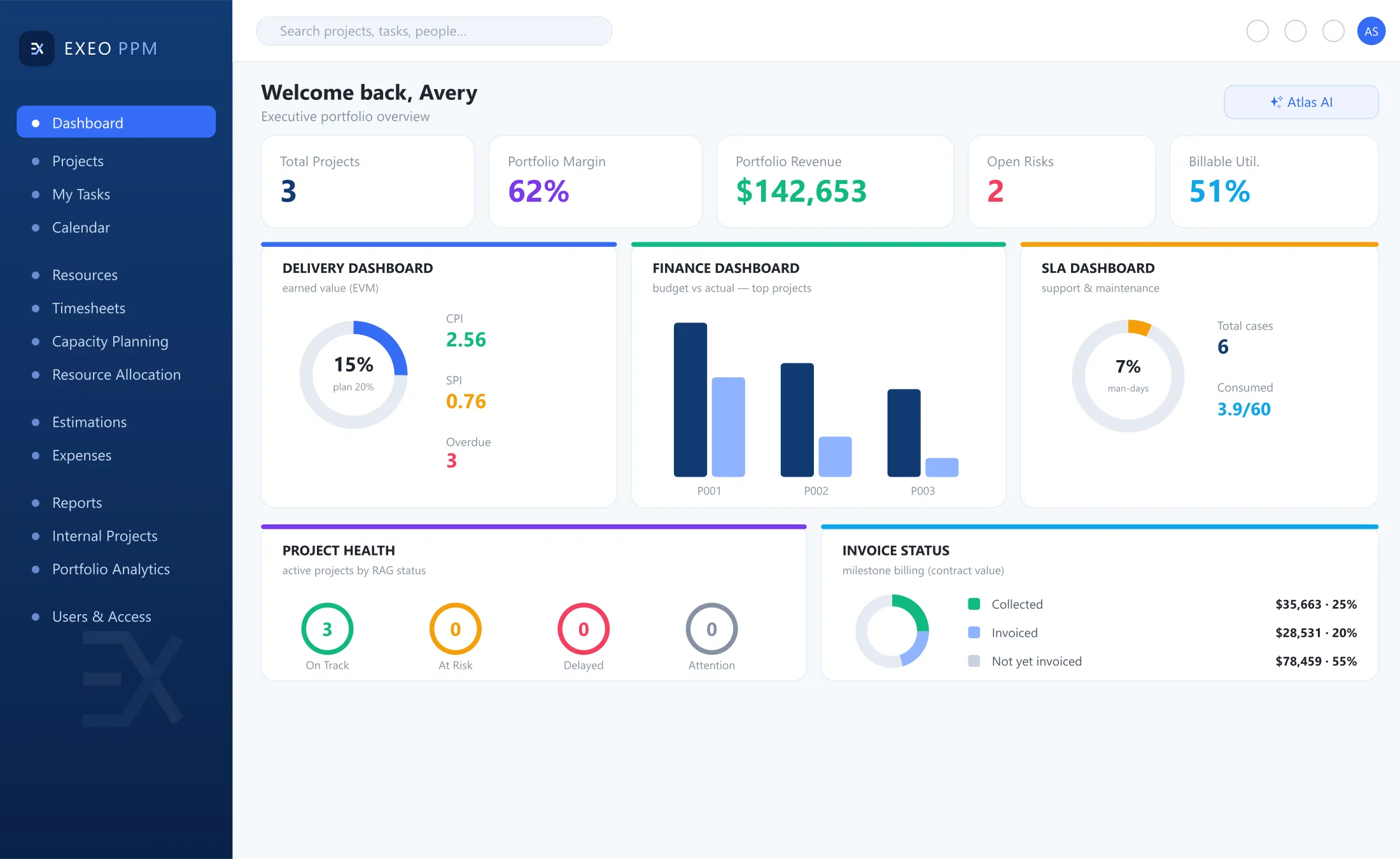
Portfolio dashboard: health, schedule, spend and billing, drilled from portfolio to task.
Capacity is a guess
Dates committed without knowing who is available or over-allocated.
In Exeo:
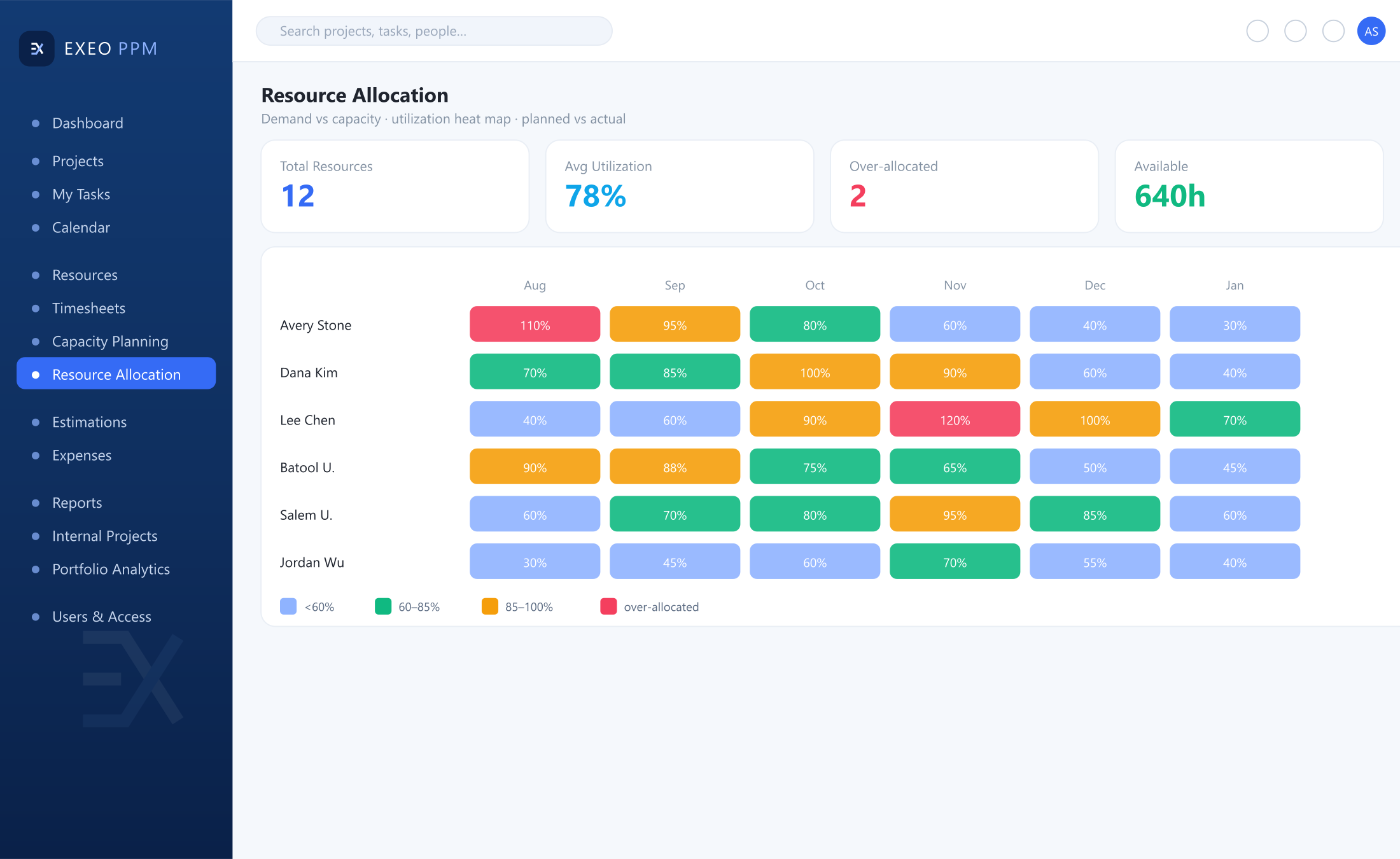
Utilisation heat map by person and role; capacity net of workweek, holidays and leave.
Cost and schedule sit apart
Finance tracks spend, PMO tracks dates, reconciled by hand.
In Exeo:
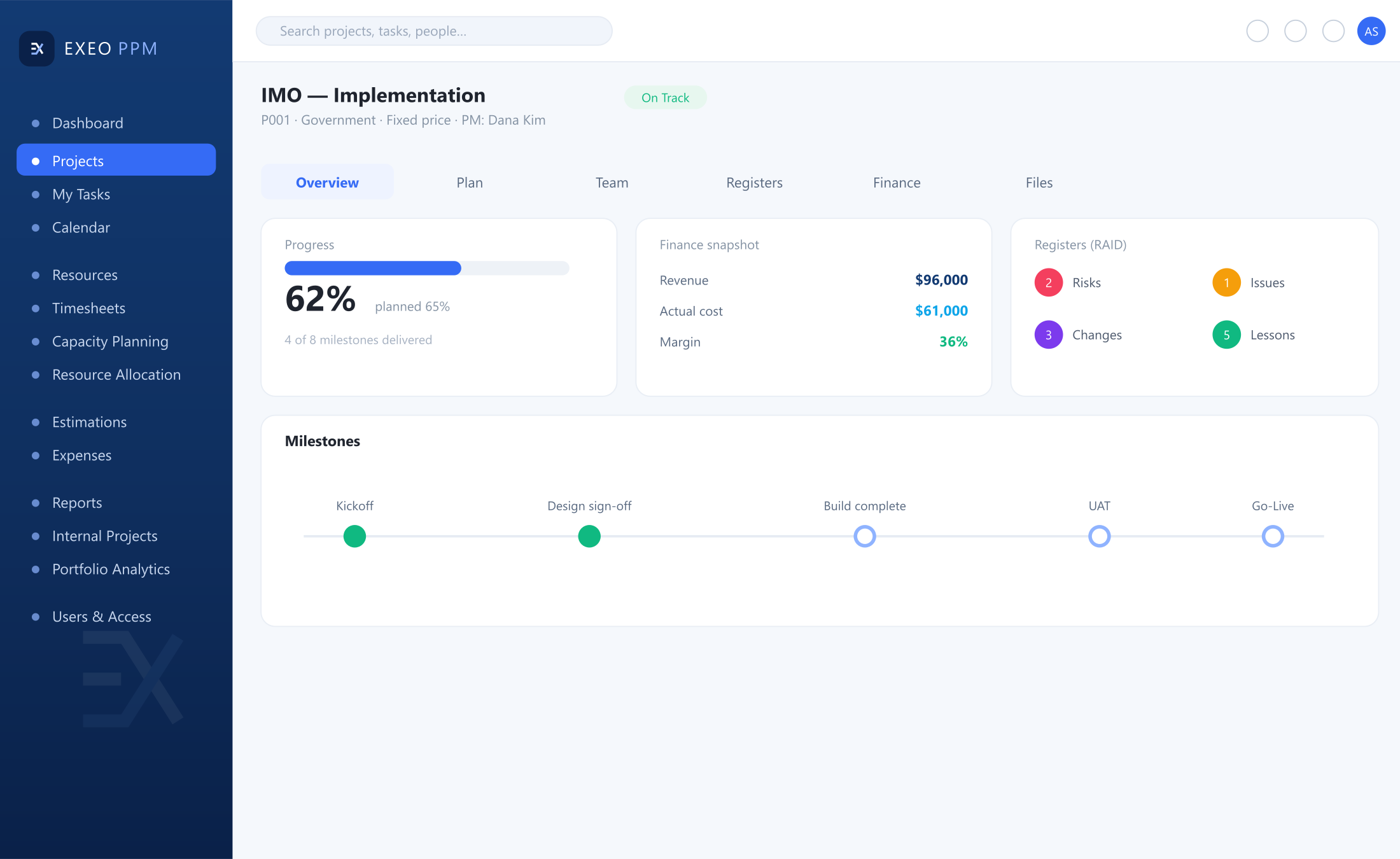
Project workspace: progress, health and milestones beside revenue, cost and margin.
Governance is inconsistent
Risks, changes and documents kept somewhere different by every manager.
In Exeo:
Risk and issue register, change requests with approval and audit, documents linked to the project.
Where margin quietly leaks away
Estimates are disconnected
In Exeo:
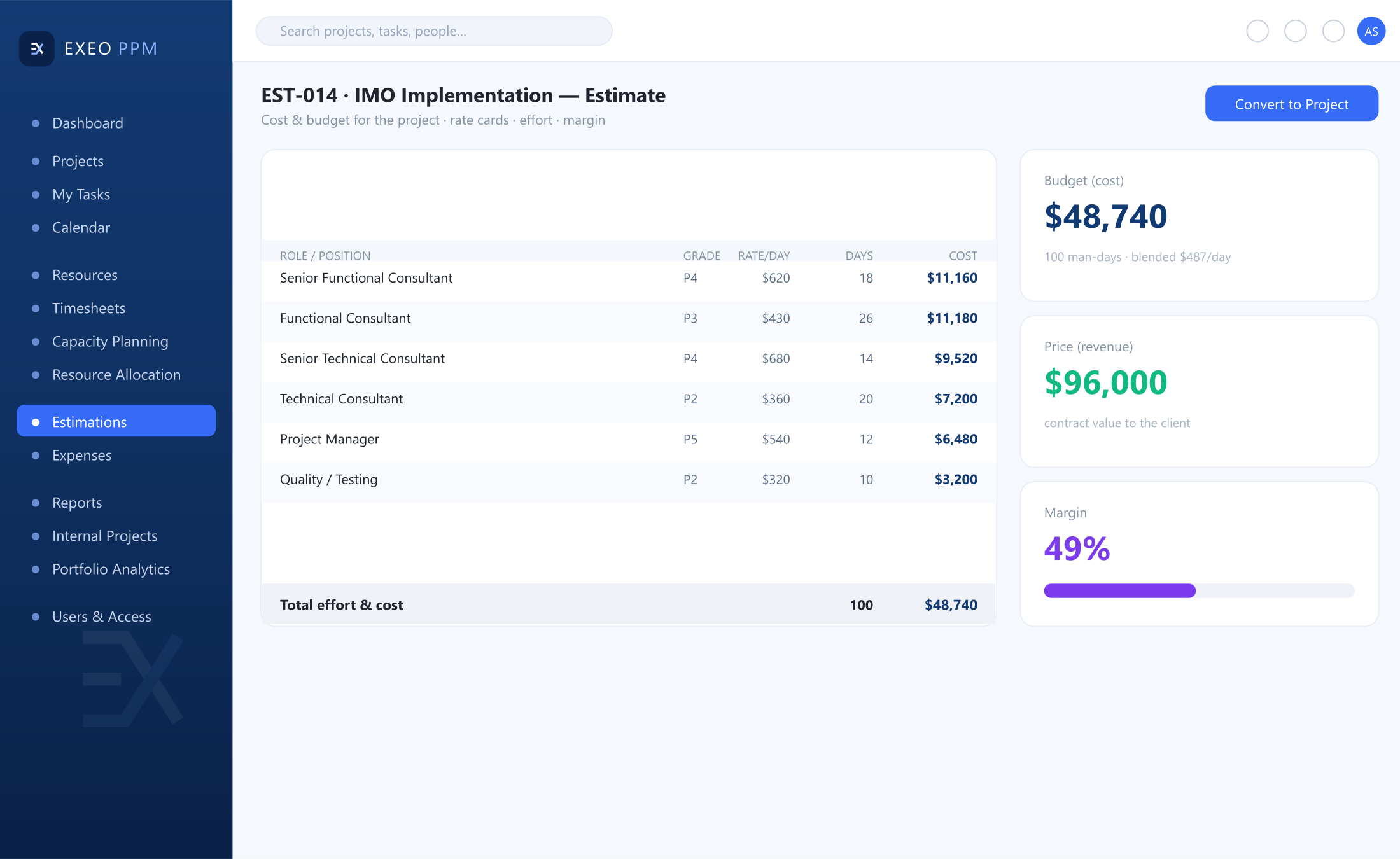
Role-based estimates from rate cards; the approved estimate converts to budget.
Effort goes uncaptured
In Exeo:
Project, non-project and leave time on one timesheet grid.
Approvals are informal
Internal work is invisible
03 — Why Exeo
One platform, from estimation to delivered benefit.
Demand, planning, resourcing, cost, governance and reporting on a single data model.
One data model
Entered once, reflected everywhere.
Configured, not custom
Your methodology, not ours.
Fields, stage gates, approval routes and reports are configuration.
Built for adoption
Used by the team, not just the PMO.
Try it: approve one timesheet
Illustrative exampleTimesheet
Weekly entry
StatusApprovedSubmittedApproved
- Progress
- Cost
- Utilisation
Entered once, reflected everywhere.
An approved timesheet moves progress, cost and utilisation in the same pass.
04 — The platform
The platform
Four areas, one data model. Inspect the real screens: every note points at the part of the product it describes.
Dashboards & reporting
Portfolio dashboard
Notes on this screen
- Portfolio dashboardHealth, schedule, spend, billing and SLA consumption in one view.
- Earned valueCost and schedule performance: CPI and SPI.
- Drill-downDrill from portfolio to task.
Portfolio analytics
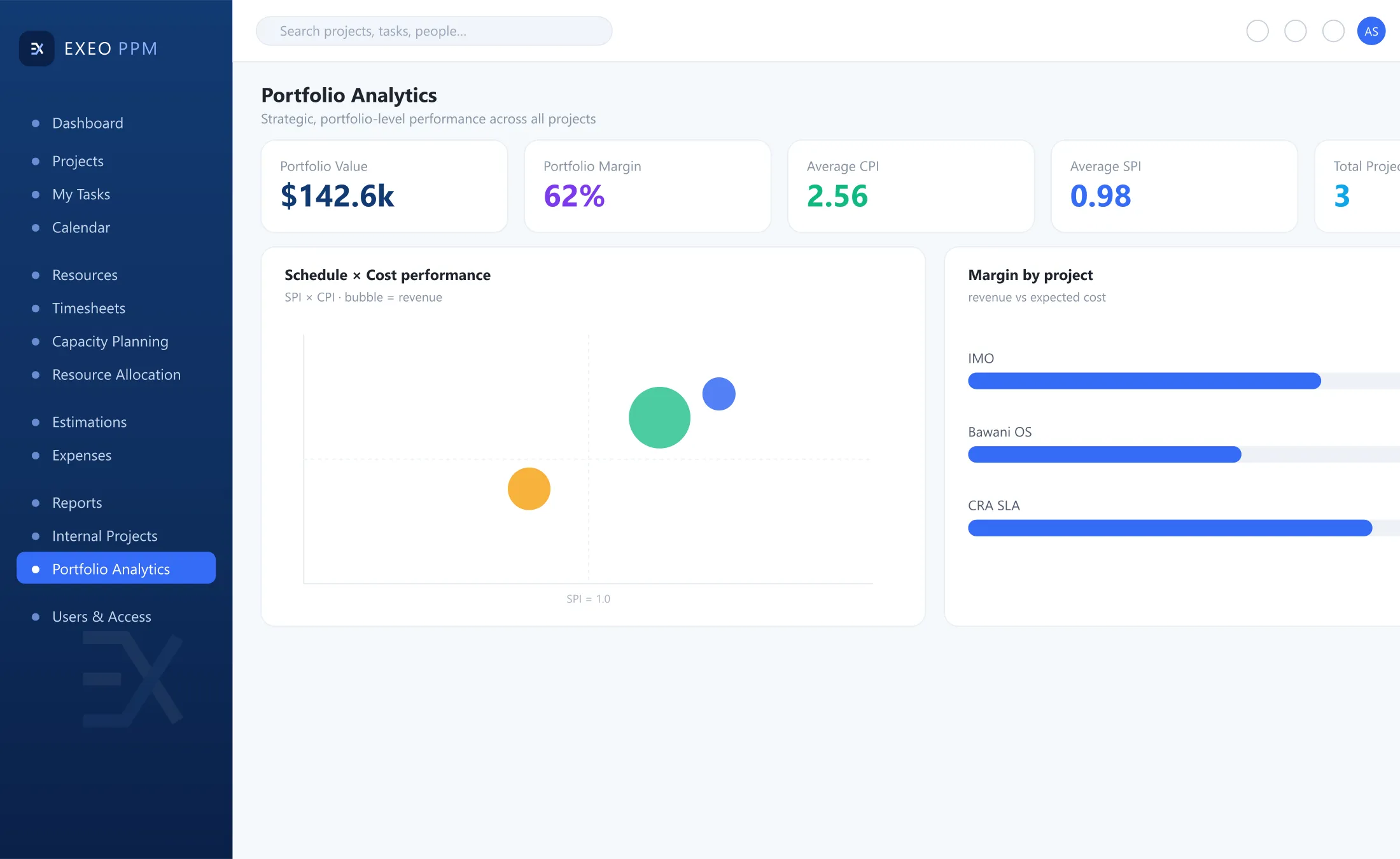
Notes on this screen
- SPI against CPISchedule against cost performance, sized by revenue.
- MarginMargin against expected cost at completion.
In this area
Portfolio dashboard
- Health, schedule, spend, billing and SLA consumption
- Earned value: CPI and SPI
- Drill from portfolio to task
Portfolio analytics
- SPI against CPI matrix, sized by revenue
- Margin against expected cost at completion
- Filters by customer, type, manager, currency and date
Reports & financials
- Budget, actual, variance and forecast
- Milestone billing: collected, invoiced, not invoiced
- Excel export and scheduled distribution
Projects, planning & governance
Project workspace
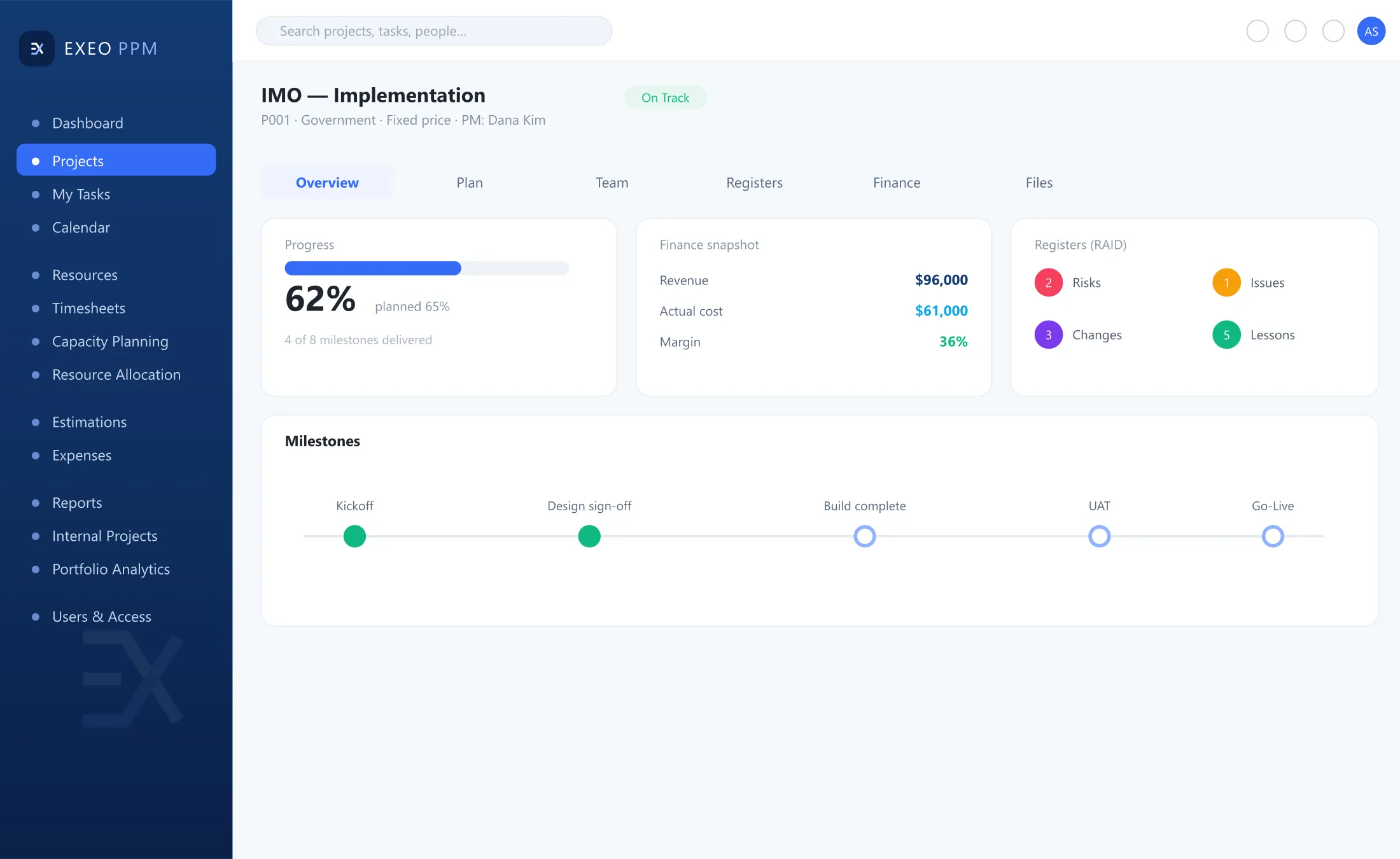
Notes on this screen
- Progress and healthProgress, health and milestones.
- Finance snapshotRevenue, cost and margin, beside delivery.
- Registers and documentsLinked to the project.
Planning & Gantt
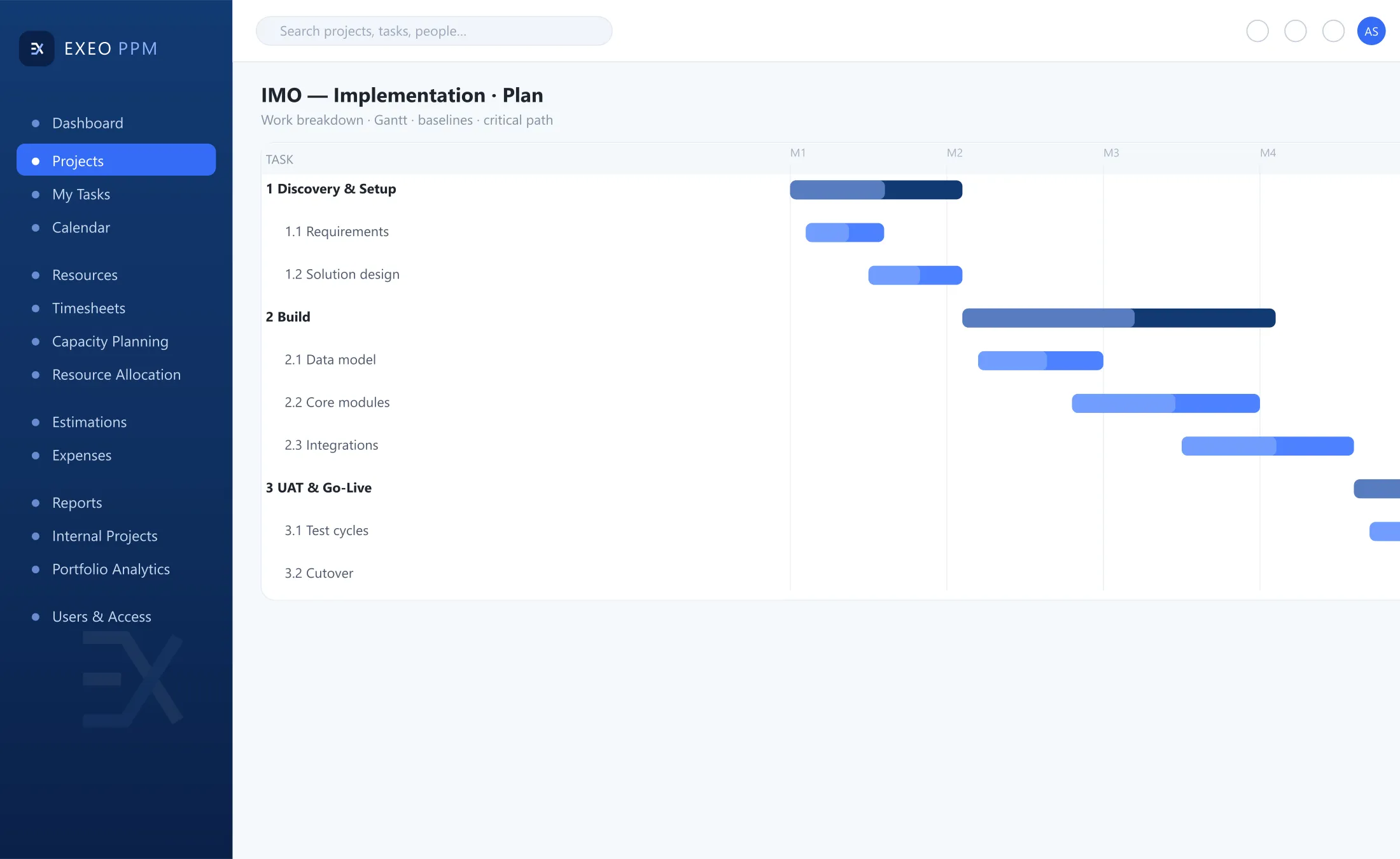
Notes on this screen
- PlanningDrag-and-drop planning with predecessors, lags and constraints.
- BaselinesBaselines to measure the plan against.
- Critical pathCritical path and float across linked projects.
Estimation & costing
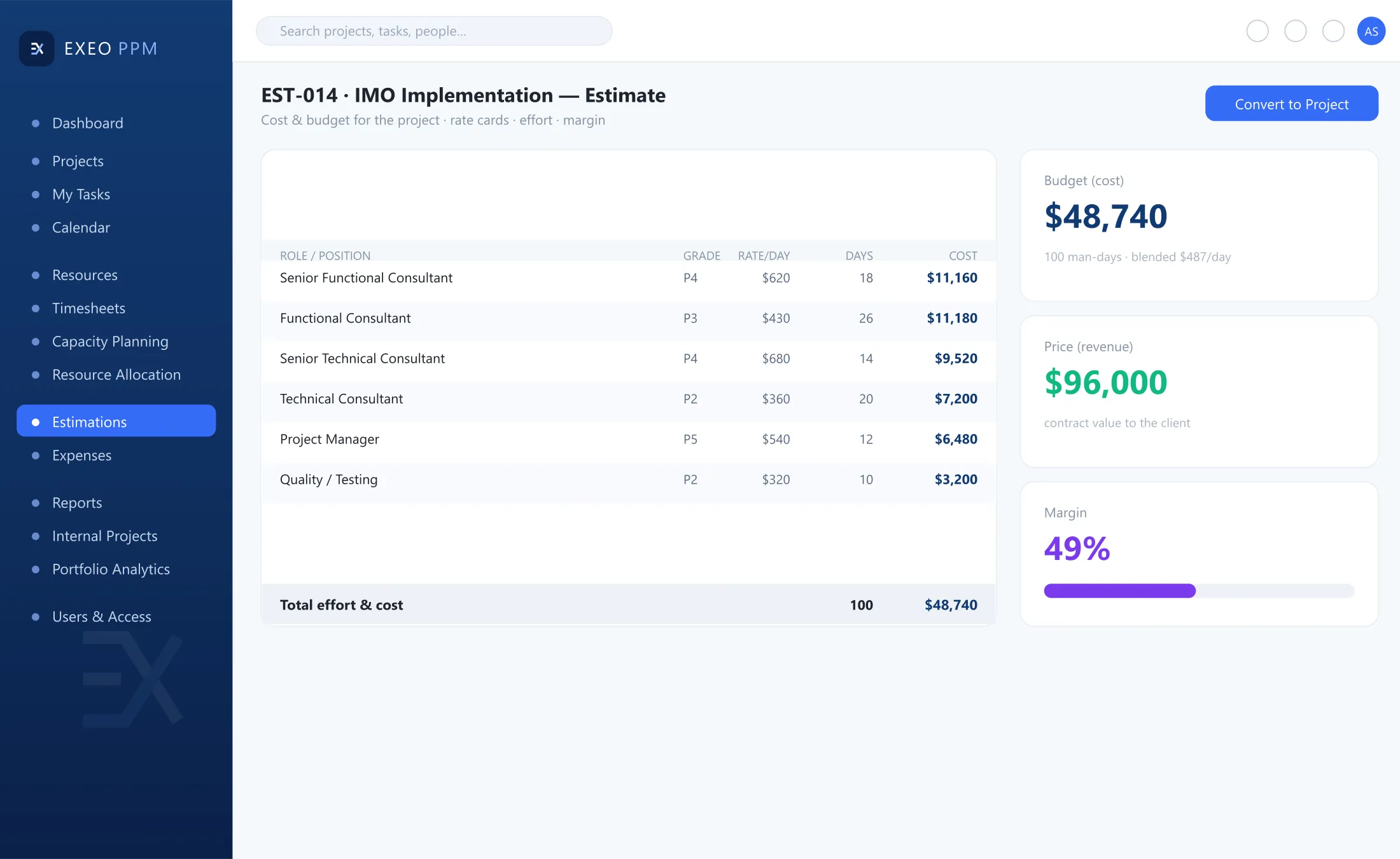
Notes on this screen
- Rate cardsRole-based man-days from rate cards.
- Cost, price and marginCalculated as you build the estimate.
- Estimate to budgetThe approved estimate converts to budget.
Risk & issue register
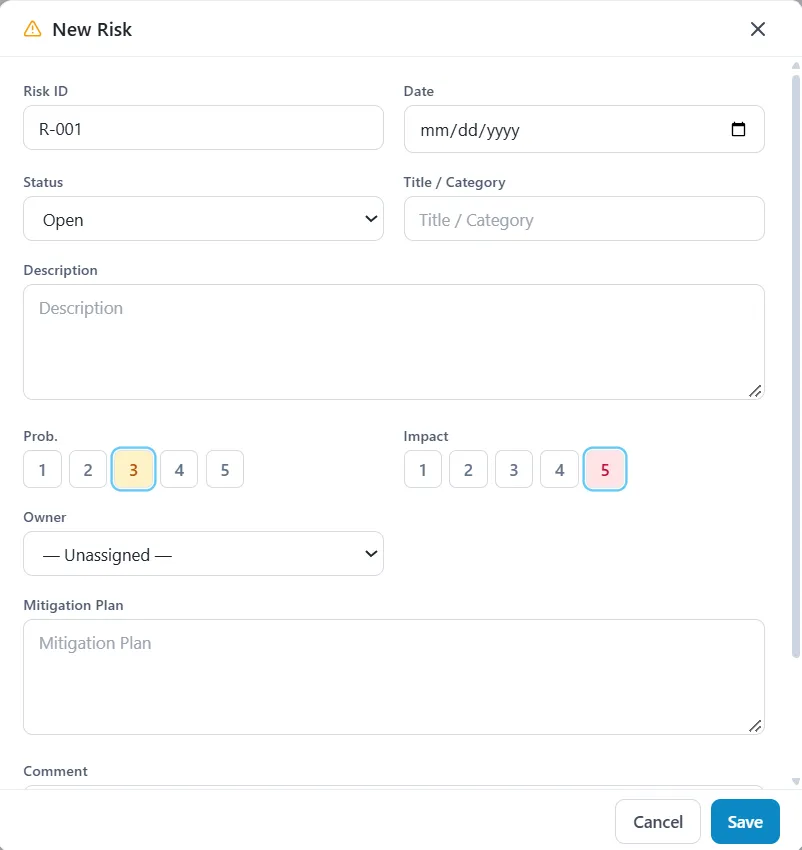
Notes on this screen
- Probability × impactEach risk scored for the heat map.
- MitigationMitigation actions become tasks.
Registers

Notes on this screen
- RegistersRisks, issues and change requests with approval and audit.
In this area
Project workspace
- Progress, health and milestones
- Finance snapshot: revenue, cost and margin
- Registers and documents linked
Planning & Gantt
- Drag-and-drop, predecessors, lags and constraints
- Baselines
- Critical path and float across linked projects
Estimation & costing
- Role-based man-days from rate cards
- Cost, price and margin as you build
- Approved estimate converts to budget
Risk & issue register
- Probability × impact heat map
- Change requests with approval and audit
- Mitigation actions as tasks
Document management
- Versioning, check-in and check-out
- Permissions inherited from project roles
Resources, time & capacity
Resource management
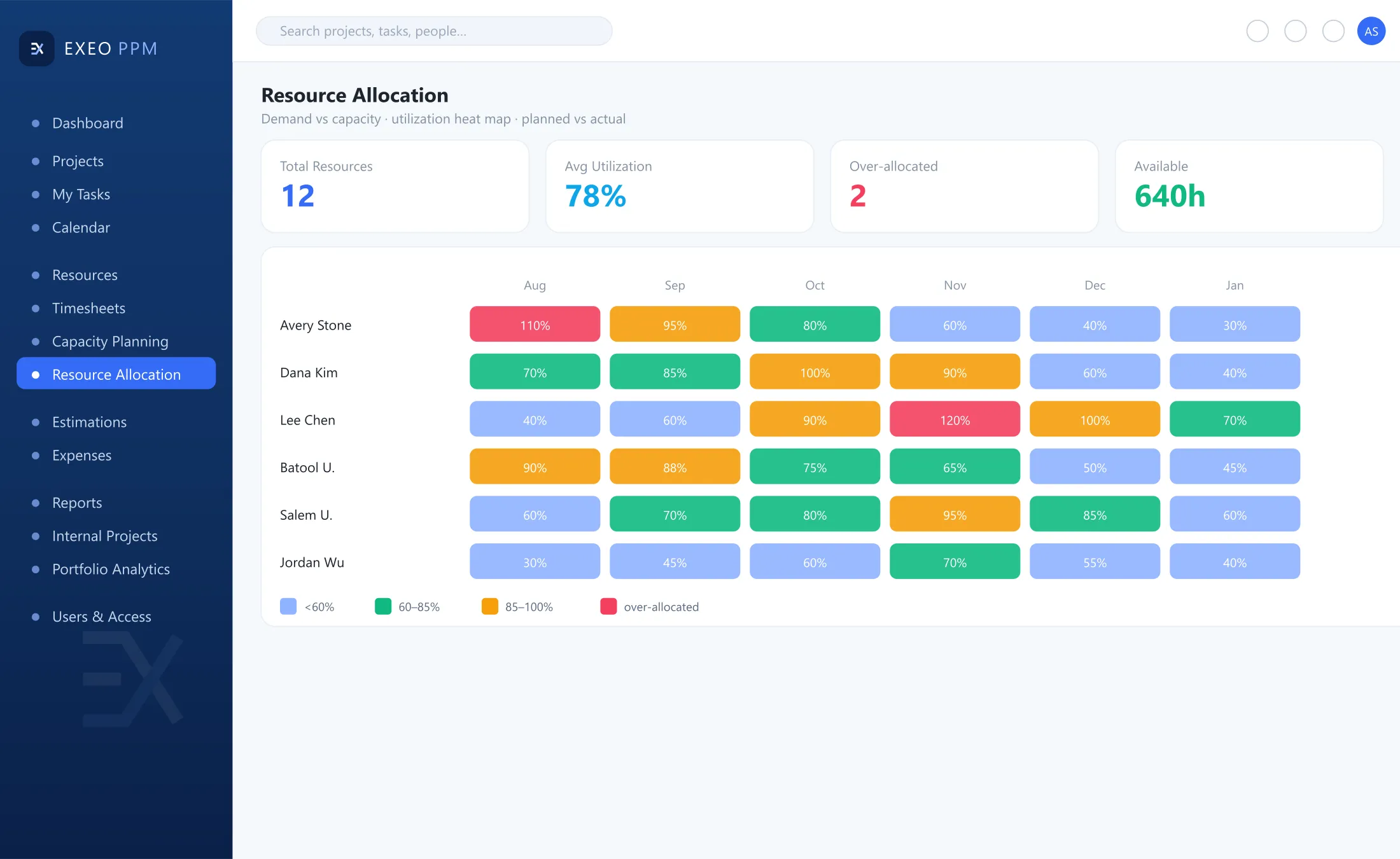
Notes on this screen
- Utilisation heat mapBy person and role.
- CapacityNet of workweek, holidays and leave.
- Planned against actualAllocation tracked, planned against actual.
Timesheets
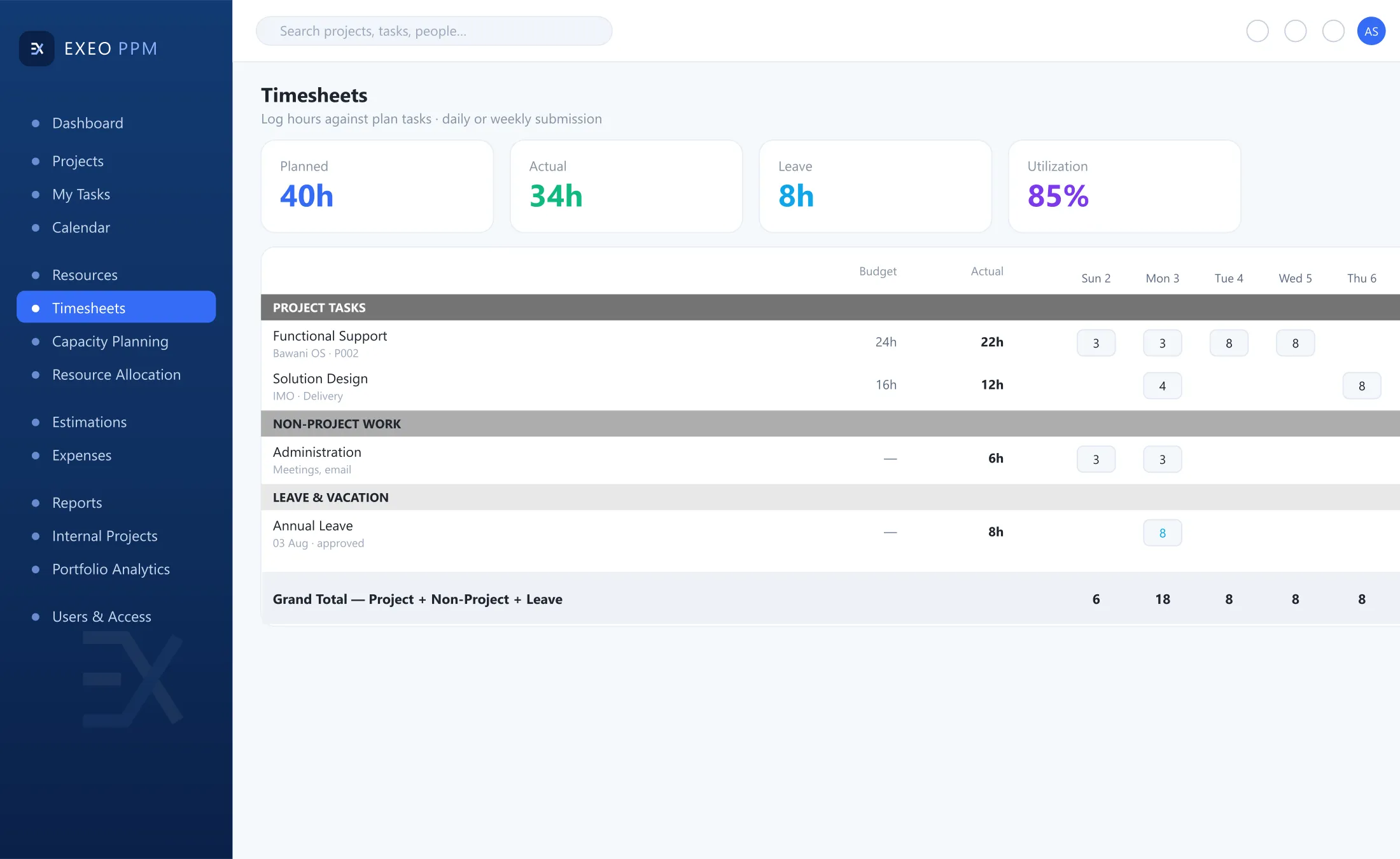
Notes on this screen
- One gridProject, non-project and leave time together.
- Daily or weeklyEnter time by the day or by the week.
- Actual hoursCost only moves once approved.
In this area
Resource management
- Utilisation heat map by person and role
- Capacity net of workweek, holidays and leave
- Planned against actual allocation
Timesheets
- Project, non-project and leave on one grid
- Daily or weekly entry
- Cost only moves once approved
Platform & security
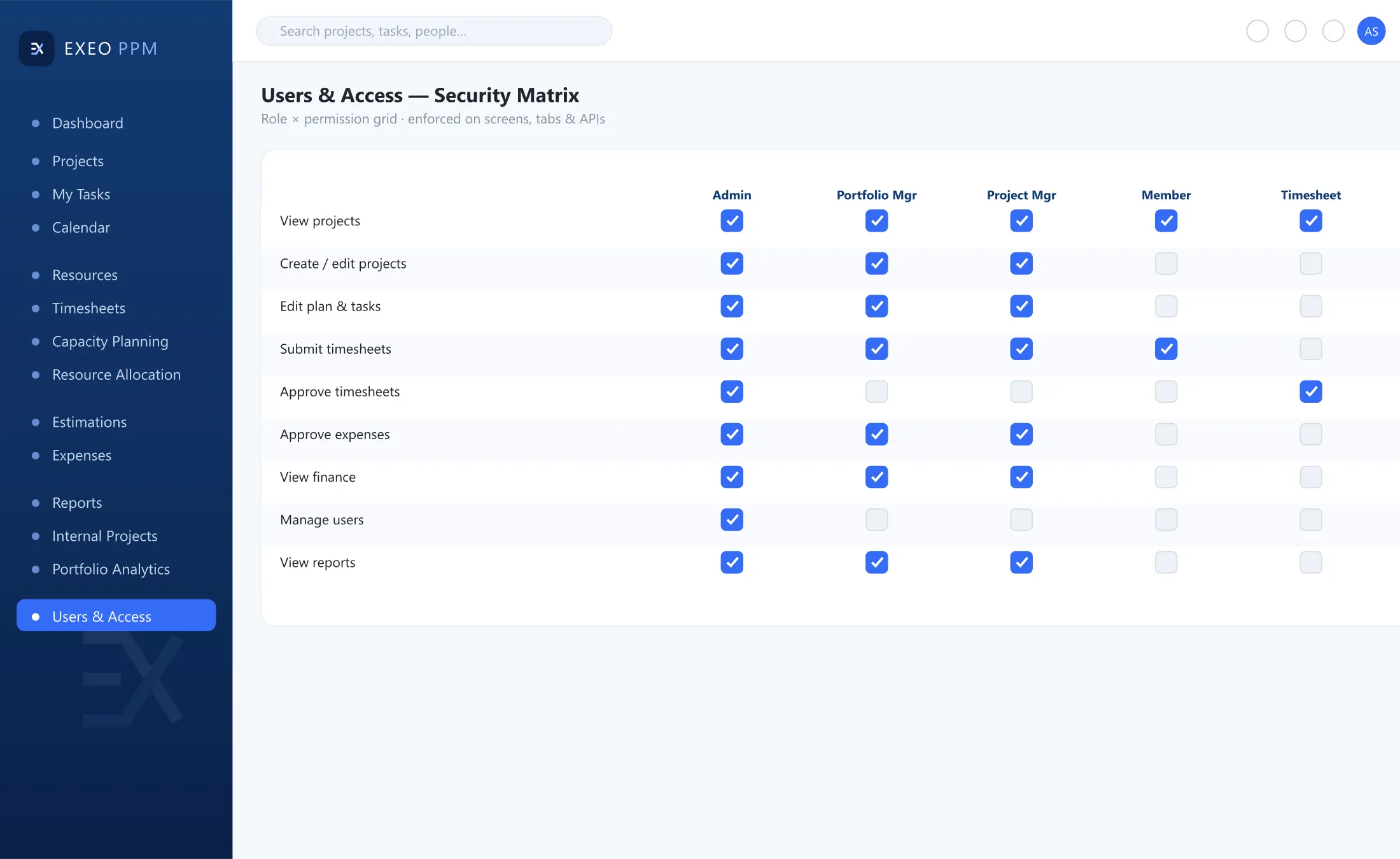
Notes on this screen
- Role and permission matrixDown to the form and tab level.
- Server-sidePermissions are enforced server-side.
- Sign-in and auditSSO, directory sync and a full audit trail.
In this area
Role & permission matrix
- To the form and tab level
- Enforced server-side
Identity & audit
- SSO and directory sync
- Full audit trail
05 — Coverage
Every type of work
Client work and internal work, governed in the same platform.
- ImplementationFixed-price / T&M
- Outsourcing & staff augmentation
- SLA & support contracts
- Internal & R&D projects
06 — Integrations
Designed to connect
On the roadmap
Exeo PPM
- Jira & Azure DevOps
- Slack & Teams notifications
- Finance / ERP interfaces
- Mobile approvals & time entry
Planned connection
These integrations are on the product roadmap.
07 — Next steps
Next steps
Requirements workshop
Half a day with the PMO.
Configured demonstration
With a sample of your own portfolio.
Implementation plan
Discuss your business priorities and Microsoft roadmap.
Start with a requirements workshop: half a day with the PMO.
Or write to us directlyinfo@consulttik.comsales@consulttik.com